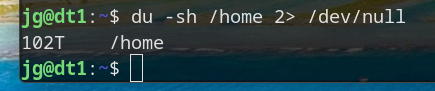
I think I officially have a hoarding problem…
You must log in or # to comment.
I create videos, and back up all of my raw footage. I make weekly videos, and the size ranges from 50GB up to 500GB or more. I have 105TB available, 90TB used at the moment. I also have a fully redundant set of another 105TB. My employer has unfortunately made it very easy to justify hoarding, as they’ll sell me reputable used commercial drives for $10/TB.
The video archives are 53TB
TubeArchivist is 19TB
Legally acquired movies and TV is 10TB
Immich is 2TB
Those are the main users of data. A bunch of other folders are using anywhere from a gig to 500GB, but those are basically rounding errors.
How often did you need a raw video older than one year?
I don’t need a raw video older than a day after the video is finished. I also don’t need TBs of legally acquired content. I also don’t need TBs of archived YouTube videos. I don’t really need a NAS. I don’t need a phone. We don’t really need any of this tech stuff actually.
To answer your question more seriously, they’re nice to have sometimes, instead of having to re-edit finished videos to make a compilation or something. I’m also hoping that maybe I’ll see some success some day and be able to hire a more skilled editor (or even just me from the future with improved skills) to turn old media into feature-length films or just better versions of what I released. I dunno. It’s data hoarding, but when I do want it, it’s super nice to have.
I’ve also seen multiple professional creators talk about regretting not keeping the original footage from their old videos, so I’m not making that mistake. It’s just nice to have it if you ever do want it, and I have the skills to archive it myself on the cheap, as compared to paying something like BackBlaze $7/TB/mo.
Just checked and my average video this year is currently at 400GB, so that’s $4*2 for redundancy, so $8 per week aka $35/mo. If it were in BackBlaze, my subscription fee would go up by $12 per month forever, and it’d currently be at $630/mo, with zero redundancy. When I frame it like that, I’d be a fool not to do it!
I have 120TB in a dell T630 at a condo i rent on the other side of the state… I replicate some Truenas volumes and proxmox backups to over VPN…an “in case the house burns down” kind of thing…
Yeah, I’ve considered doing that, but most of my media is static and doesn’t change and, with my upload speeds, would take literal days to sync. So I just have a set of HDDs that I keep across the state. I’ll loose some if everything fails, but at least I’ll have most of it.
I brought the two into the same room for the initial sync…then drove the T630 to the condo and hooked up, and it’s all incremental updates over the 1G VPN. :)
Yeah, I have 40Mbps uploads at my house, that’s the best I can get. I create anywhere from 100GB to 3TB of footage per week. On the high end, it’d take an entire week to sync, sucking up all of my upload bandwidth for that time, meaning I wouldn’t even be able to upload the videos I create to YouTube/PeerTube in a reasonable amount of time. When I get faster upload speeds I’ll definitely have to build a remote NAS for closer to real time backups.
OOhh ouch, that sucks ass… If I didn’t have Gigabit synchronous at the source there is no way I would even attempt replciation…I’d be carrying spare drives with me every time I go down to visit my grandson. ;-)
That’s exactly my plan haha, and yeah, it sucks. Thanks Comcast.
Why do you pipe stderr of du into /dev/null?
To keep the errors out and provide just the result.
One think I miss from reddit… /r/datahoarder
These were my people. I probably have 100TB but it certainly isn’t in my home directory. I’m not sure if I should be immpressed or freightened.
There’s !datahoarder@lemmy.world, !datahoarder@lemmy.ml, and !datahoarder@selfhosted.forum…
EDIT: spelling
Well TIL … I subscribed to the first two but the last one didn’t work for some reason.
I was like “nothing wrong here” until I saw that T that my brain just refused to parse the first time.
Meanwhile here I am trying to upgrade my 512gb NVME drive to 2Tb while also still trying to afford car payments, rent and food. Rookie numbers on my part.
The most well-timed thing I ever did was buy 6 2tb NVMe drives in August last year
God help me if one fails
ZFS it
That’s why there are 6. There’s a pool with a hot spare. Just don’t want to pay $350 or whatever to replace a $90 drive.
Your username absolutely does not check out. Or your shredder is broken haha
For working I’m a backup and DR guy…the name was intended to be ironic. ;-)
I shred paper. ;-) After digitizing it of course. ;-)
Pardon my stupidity BUT why include stdout to Devnull? Why not omit and simply ‘du -sh /home’
There’s probably a bunch of permissions errors, filesystems warnings for cross-filesystem mounts or links, etc. all going to stderr. Linux output streams are a bit odd, 1 is stdout and 2 is stderr. So the command is redirecting the “noise” to null and just printing the actual command output. That would be my assessment, but OP could probably give a more correct answer…!
Noob, just use sudo, less chars!
Oddly enough, still generates errors. (There are stuff in user directories that are set to 600… so even root can’t browse/open.)
Are you sure? Root can see everything.
On a network, it can’t.
NFS mount probably.
never saw the s argument and was curious what’s the difference to d. man pages are way ahead of me ^^
--max-depth=0is the same as--summarizeSo just did a couple of experiments…
sudo su -sh /home - returns permission denied errors on certain NAS subdirectories, but not a lot.
du -sh /home --summarize -returns the same errors.
du -sh --max-depth=0 - returns the same errors plus an error saying that using --max-depth=0 is the same as --summarize.
;-) for the purposes of what I was doing (creating a clip for posting) redirecting stderr to null was the best option.
But I learned a few things today, which is cool. ;-)
I’m reading the command to the tune of Du Hast
Du hast mich. Du hast mich gefragt UND ICH HAB SPEICHERPLATZ
Is there any advantage of using
duoverdffor this?Someone may eventually write CLI programs called
hastandmichthat you can somehow usefully pipe to itYeah it lets you have time to get some tea while it works.
dfonly shows partitions, whereasduadds up the file sizes in the directory you specify.So, in particular, if you want to find out what’s taking up so much space, you can repeatedly run
du -sh *andcdinto the largest directory.Or you run
ncduand save some keystrokes.
Pfft, the only “hoarding problem” is that storage is expensive these days!
I know, I just paid $500 for a 24TB SAS drive that was $250 just over a year ago.
That’s a good deal. Microcenter was selling a WD 20TB external HDD for $600. Didn’t end up pulling the trigger 'cause I’m going for a 2 drive Raid1 config on my janky setup and $1350 w/ taxes is way too steep.