• 4 Posts
  • 15 Comments
Joined 11 months ago
cake
Cake day: August 25th, 2025

help-circle


  • I love that, and would absolutely welcome it.

    I actually have a repo at codeberg up where ive started moving the rules and things for public access/visibility, and thought that a wiki could go there (and be easily brought elsewhere if needed without any intervention needed by me).

    Even if was just links to resources we could post up, whatever.

    I’d be happy to spin up another repo just for wiki use and link it in the sidebar. The big issue is, of course, the content itself, so we will need some folks to contribute.

    But if its an interest I can get this started in a few hours (summer sports for the kids, probably not going to be home for more than a few minutes for about… 4-5 hours)


  • Ok, I’ve got some utility/usability comments:

    Exercise Creation:

    • Both options (manually creating and json import) work without issue
    • It may be handy to create some kind of per-exercise export specifically to be shared to others. I’m thinking since its just json it could live in a repo on a per exercise basis, right next to the app itself (not necessarily the same repo).
    • It would be good to have an option to either add your own equipment type or allow a searchable tag. I sometimes make a workout on the fly based on whats available at the gym (like if I’m traveling), and this would help for quick searches. I also have some equipment here at home that I use that would be handy to include or exclude (like if my kids are using the slackboard).

    Workout:

    • The overall timer is good, but a per exercise timer inside that would be great along with a settable rest time. If I’m doing 2 minutes of weighted carries for example, I’d want to start the timer, get a countdown, then get a beep or something when the timer hits. That should be settable for the exercise.
    • For a settable rest timer, if the exercise itself has a timer, then a “rest” could just be an exercise with a custom timer. This would be per rest settable, not overall. For example, if I’m doing an HIIT circuit I may want a 20s rest between exercises, but then at the end I may want a 2 minute timer to run before starting another round.
    • Ideally I’d want to also grab HR data off my chest strap sensor, whether I’m getting it in-app during the session or after. I’ve made a couple of apps to pull that data in (entirely different purpose btw), its not too bad for devices like polar with a clean api, but you could also do something with an import possibly. It would be that or the other way around, allow the session data to be available for export, which would be drastically easier as a PWA. Since this is more structured indoor training/logging, a timestamped csv is probably best, though json would be fine too.

    I know you’re not looking to add features in when you’re at RC, just some general feedback on what I like to see/do


  • I have put in zero effort to figure out the issues btw, just first run stuff that I’m seeing:

    From the logs:

    lifttrace  | [2026-06-26T19:30:58.039Z] [INFO ] [seed] Seeded 3 starter program templates  
    lifttrace  | [2026-06-26T19:30:58.040Z] [INFO ] [exercise-sources] Library is emptyauto-seeding: wger, free-db  
    lifttrace  | [2026-06-26T19:30:58.040Z] [INFO ] [exercise-sources] Importing from wgerlifttrace  | [2026-06-26T19:30:58.107Z] [INFO ] [scheduler] Starting 15-minute tick loop  
    lifttrace  | [2026-06-26T19:30:58.111Z] [INFO ] LiftTrace running on port 3003  
    lifttrace  | [2026-06-26T19:31:00.419Z] [INFO ] [exercise-sources] wger: imported 858  
    lifttrace  | [2026-06-26T19:31:00.419Z] [INFO ] [exercise-sources] Importing from free-dblifttrace  | [2026-06-26T19:31:00.606Z] [INFO ] [free-db] processed 873, inserted 873  
    lifttrace  | [2026-06-26T19:31:00.606Z] [INFO ] [exercise-sources] free-db: imported 873  
    

    I then opened and ran through the initial config, setting my username up as the first account, and logged in.

    Once there, every time I switch a context to exercises, settings, etc, I see a “Not Authenticated” popup despite showing as logged in, and having just logged in with the newly created user moments before. Also, the exercise database is empty, along with no programs. I would assume this has to do with the authentication issue, but again I haven’t dug into it at all.

    Edit: Odd, I shut it down, checked the configs (but made no changes), and logged back in - exercises were loading and the “Not Authorized” toast stopped appearing.

    Local DNS redirects to local NPM for my test vlan, which is pointing to the container host - to share the setup.

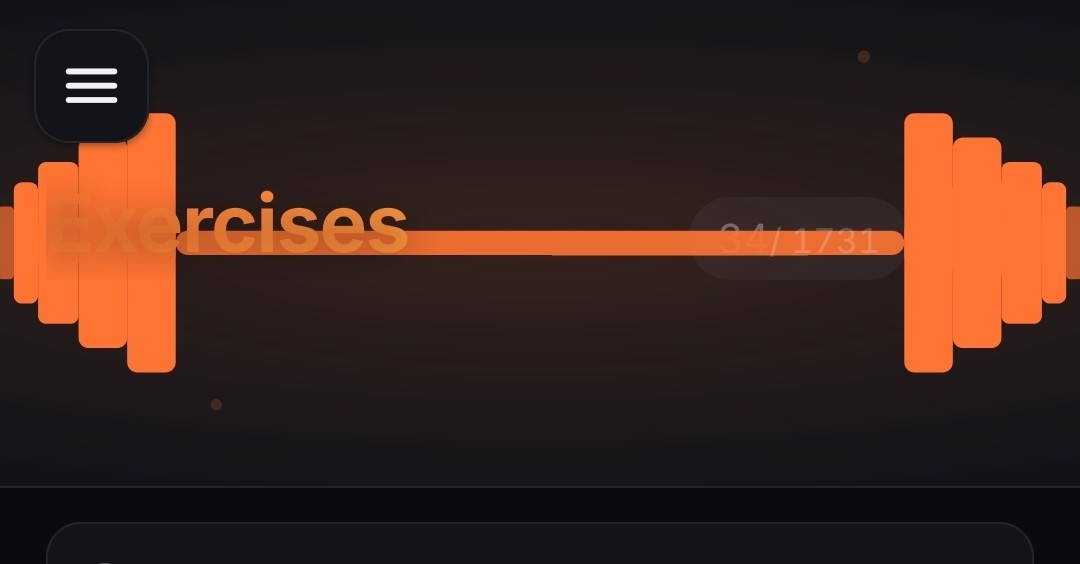
    Edit 2: Also the Exercises graphic draws on top of the Exercises text, and becomes unreadbale on mobile. It just reads as “rcises”.

    Apparently my last edit didnt stick around - I also didnt see the add button or the qty of exercises until I looked on the desktop.